01 — THE REALITY
A studio doesn't run on one kind of booking.
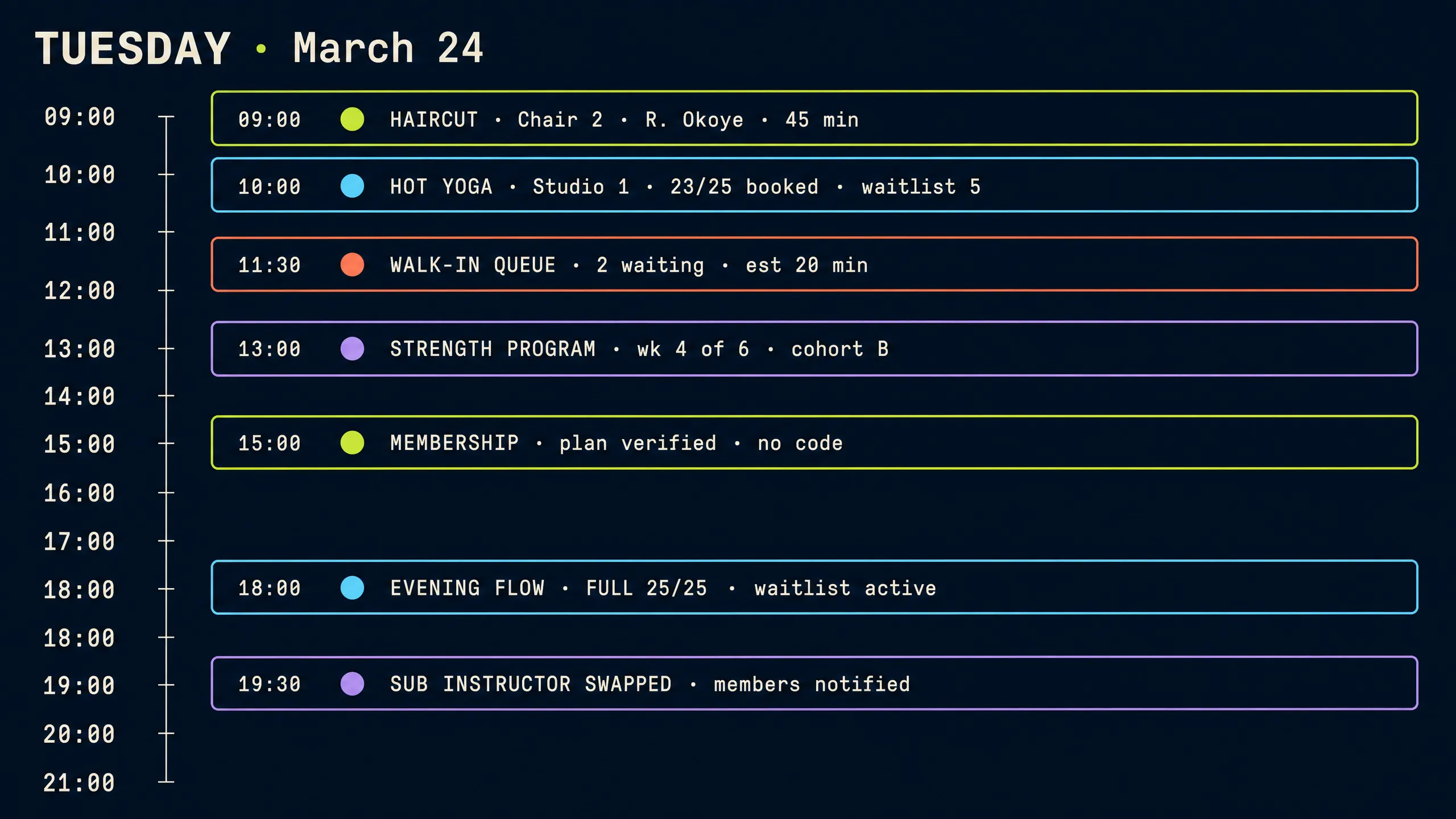
Tuesday, like most days: a haircut at nine, a packed class at ten, walk-ins all afternoon and a substitute teacher at night. Different booking shapes, different rules, one day. Each of these moments has its own physics — capacity, duration, eligibility, staffing, notice — and the cost of the day is carried by the team that has to keep all those rules in their head at once.
A 1:1 service
A haircut lands on a specific chair and a specific stylist, with the client's history attached to the booking. The stylist knows it is the colour correction client, not just a name on a calendar. One chair, one person, forty-five minutes, buffered correctly.
A 25-person class
A hot yoga class with 23 booked, 2 spots left and a waitlist of 5 waiting quietly. The room rule, the instructor's roster, the member-only pricing and the waitlist all live on the same event — not in three different places.
A walk-in
No booking, no notice — they join a live queue and get a real wait estimate, not a shrug. An SMS tells them when their turn is near, and the appointments booked weeks ago are untouched.
A recurring course
Week four of a six-week program. The cohort stays intact, the series remembers its members, and re-enrollment opens with a window instead of a paperwork scramble. The calendar treats the whole course as one unit.
A membership booking
A member books at member rates without typing a coupon code. The plan's eligibility, remaining credits and billing state are checked inside the booking — the front desk never has to arbitrate who qualifies.
A full class + waitlist
The evening flow hits its 25-spot capacity. Every cancellation re-offers the seat to the next person in line with a configurable response window — the class stays full without anyone manually chasing members.
A substitute instructor
The evening teacher cancels. One click swaps in the substitute — enrolled members are notified, the pay rule follows the new assignment, and the rest of the recurring series doesn't blink.
The shift closes itself
Cash-out, tips, attendance and revenue records are already written down for the pay cycle. Tomorrow's classes are filling and lapsed members are receiving a win-back message — no end-of-day data entry.
That's not an edge case. That's Tuesday.
02 — THE PROBLEM
When every booking behaves differently, the calendar isn't enough.
Classes have capacity. Chairs have buffers. Walk-ins have no notice. Memberships have rules. Treat each as its own system — a separate tool, sheet or notebook for each — and the team becomes the glue between them. Every morning the studio rebuilds the picture of its own day by hand. QUE holds them as one operational map instead.
Not eight tools held together by one very patient person — one system where classes, chairs, instructors, capacity, members, walk-ins, waitlists, payments, tips and follow-up all live around the same calendar.
03 — SCHEDULING
One schedule for every way you sell time.
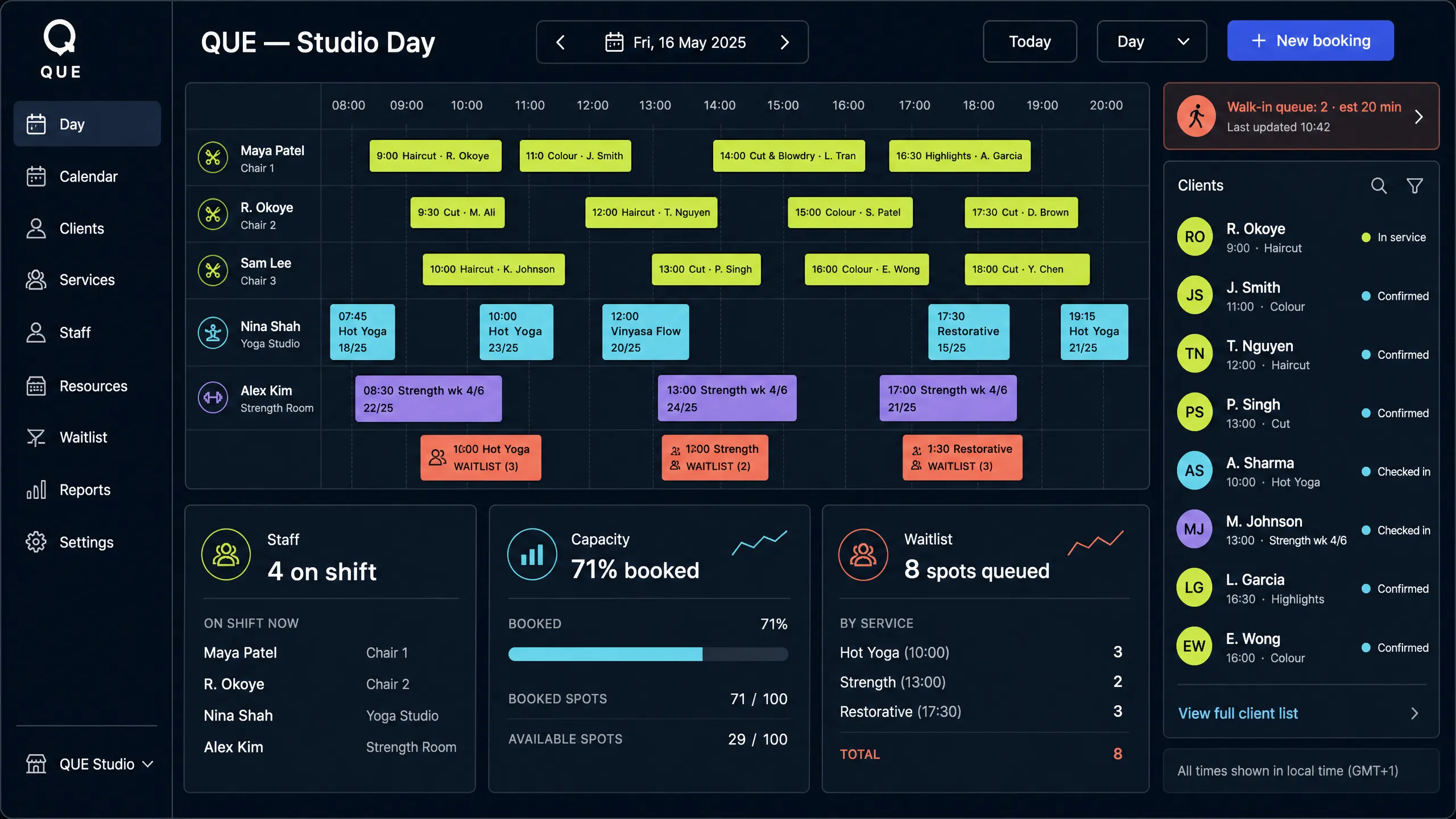
A haircut, a yoga class, a strength session, a bridal trial, a walk-in queue and a recurring course — same day, same calendar, each keeping its own capacity, duration, recurrence, waitlist, staff and resource rules. The schedule should read like a truthful account of the business, because it is the single document the whole team works from.
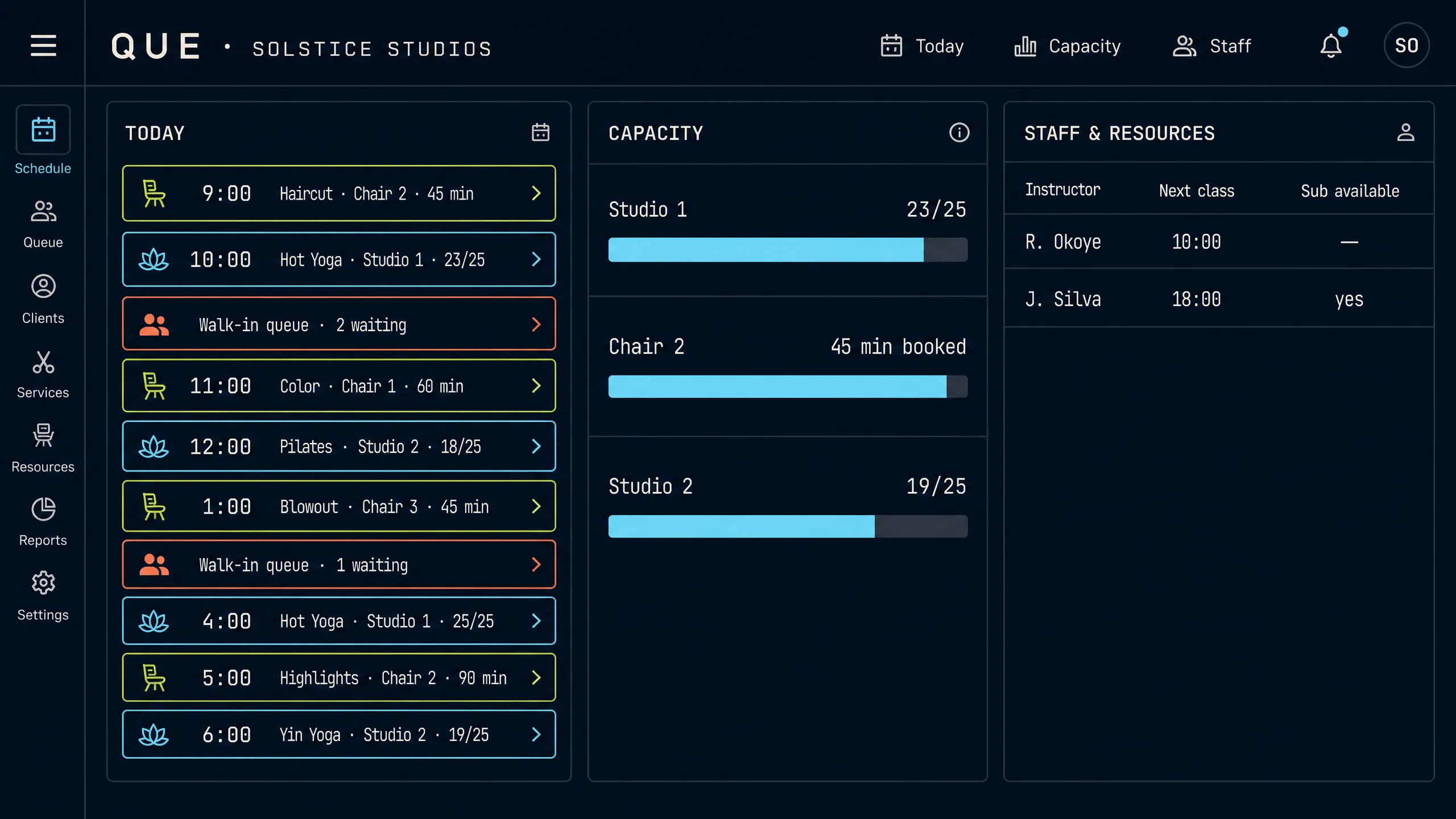
Your schedule finally looks like the business — not like a workaround.
04 — WAITLISTS
When a spot opens, don't make your team chase it.
The most wasted minutes in a studio are spent re-filling a seat that was already wanted. QUE watches the calendar and moves the waitlist before anyone notices there was a gap.
Class full
Evening flow at 18:00 hits its 25-spot capacity. New requests join the waitlist instead of being turned away — demand is recorded rather than lost, and the waitlist length tells the team which classes deserve a second session on the timetable.
Cancellation
A member cancels inside the notice window. The seat opens instantly, and the waitlist is notified before anyone has to ask — no checking a clipboard, no re-reading a group chat.
Promotion
The first person in line is offered the spot with a configurable response window. If they don't answer in time, the offer falls through to the next member automatically — no phone tag, no spreadsheet, no awkward follow-up calls.
Confirmation
The promoted member confirms in one tap. Their membership eligibility and pack balance update in the same action, so the booking arrives on the instructor's roster already validated.
Capacity restored
The class is full again and the waitlist shrinks by one, with every remaining position moving up. The day's math stays true without a human doing the arithmetic — and revenue that would have evaporated stays on the books.
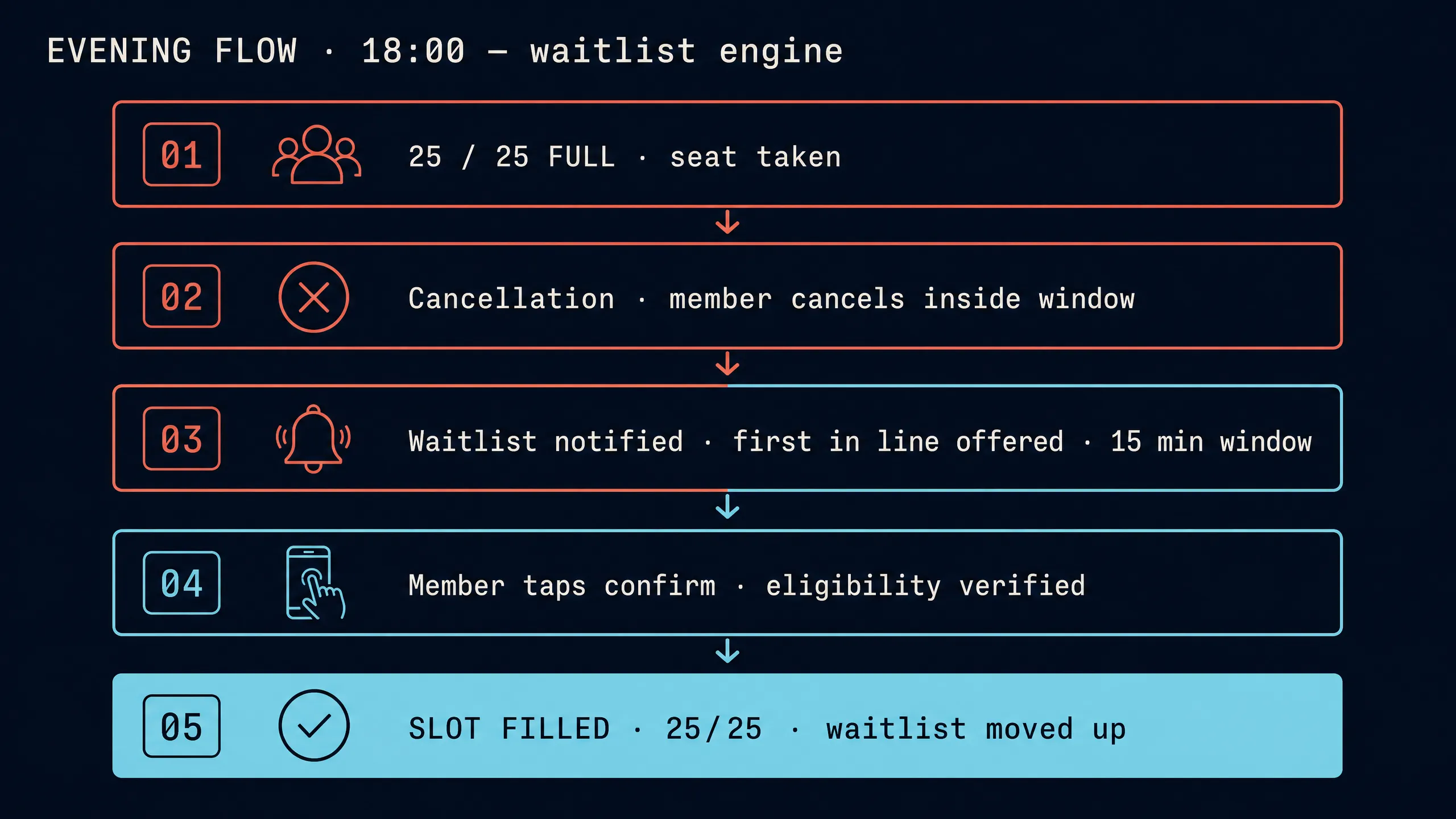
A full class should stay full.
05 — MEMBERSHIP
Sell memberships the way your studio actually sells them.
Unlimited, ten-class packs, family plans, corporate seats, paused members and drop-ins — configured as real plan shapes, not workarounds.
Member-only services open; no coupon codes needed.
Low-balance warning fires at 3 credits. Auto-consume on booking.
Separate profiles and progress, one billing identity.
The seat survives the pause; nothing has to be rebuilt.
What happens when a member books
The whole eligibility question — does the pack cover this class, is the plan active, how much is left — is answered inside the booking.
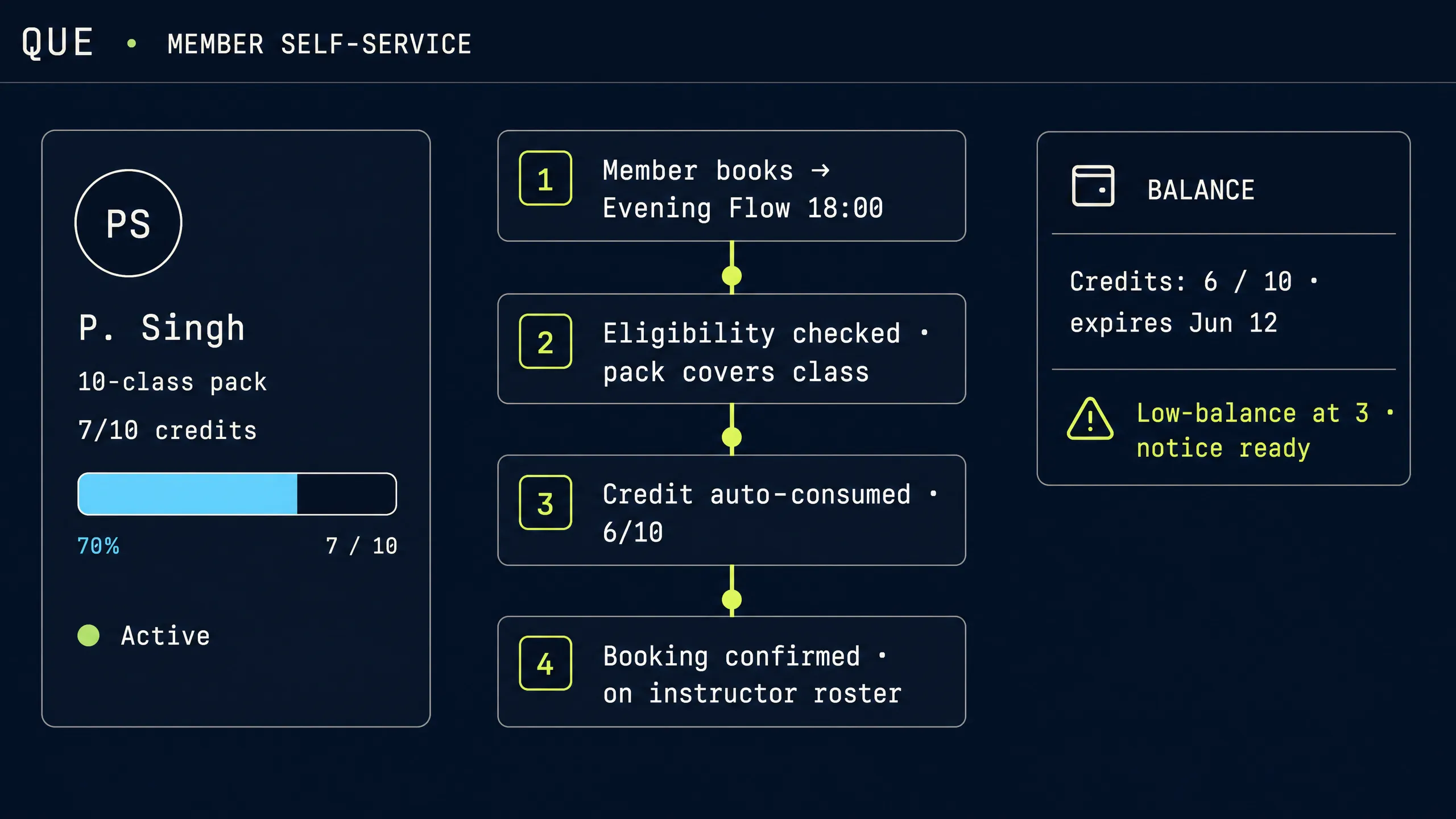
Less "does this membership cover it?" — more "you're booked."
06 — FRONT OF HOUSE
Give the front desk fewer things to juggle.
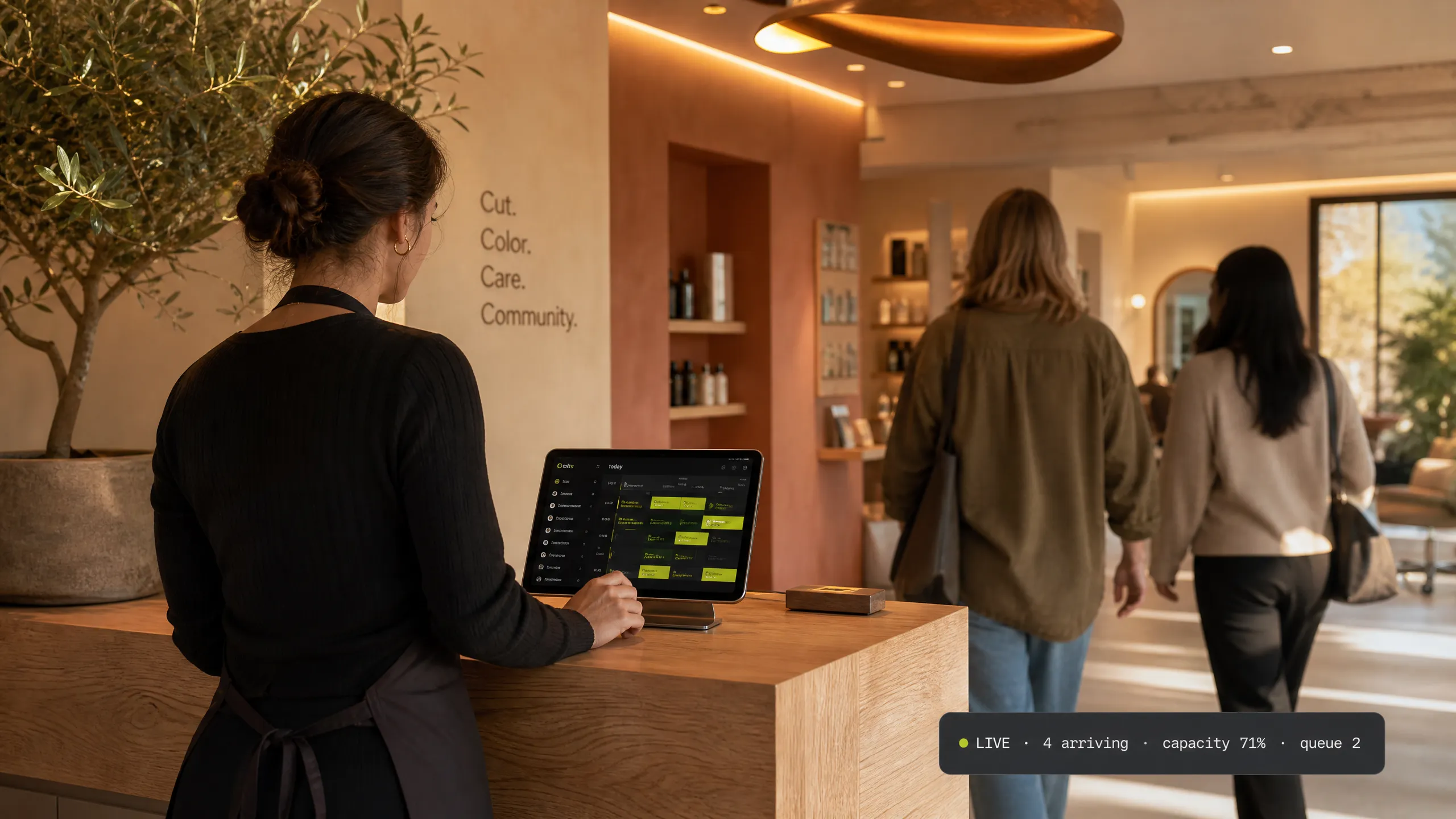
A customer arrives. Someone asks about their membership. A class is filling. A walk-in is waiting. A tip needs to be handled. A schedule just changed. That's one minute at a busy desk — and traditionally it means six different systems. The front desk is the most human part of the studio; it shouldn't spend its energy being the glue between tools.
Without a shared view, each of these is a different system:
The calendar for who is where
The spreadsheet for memberships
A notebook for the waitlist
The till for tips
A group chat for schedule changes
With QUE, it is one operational view:
Arrivals show plan status
Eligibility answers itself
Capacity updates live
The queue has a number and an estimate
Tips, changes and shifts land in place
The front desk should welcome people — not act as air traffic control.
07 — CHECKOUT
Keep the last five minutes of the visit about the customer.
Service, add-on, tip, checkout — with staff attribution and a shift summary that writes itself. Tipping is prompted at the moment of checkout and attributed to the person who did the work.
The business effect is quieter than the mechanism: clients leave feeling looked after instead of processed, and staff leave knowing exactly what they earned.
The goodbye matters more than the invoice.
08 — TEAM PAY
Turn the work they did into the numbers payroll needs.
Per-class, per-head and revenue-share rules live on the staff profile. QUE records the work those rules run on — hours, classes and sessions — and exports a pay-cycle record your payroll workflow already speaks.
Staff profile
Pay rule, rate and tier set once.
Sessions & classes
Work records as they happen.
Pay rule
Per-class · per-head · revenue share.
Pay-cycle record
Totals, tips and splits per cycle.
Export
Payroll-ready file, auditable.
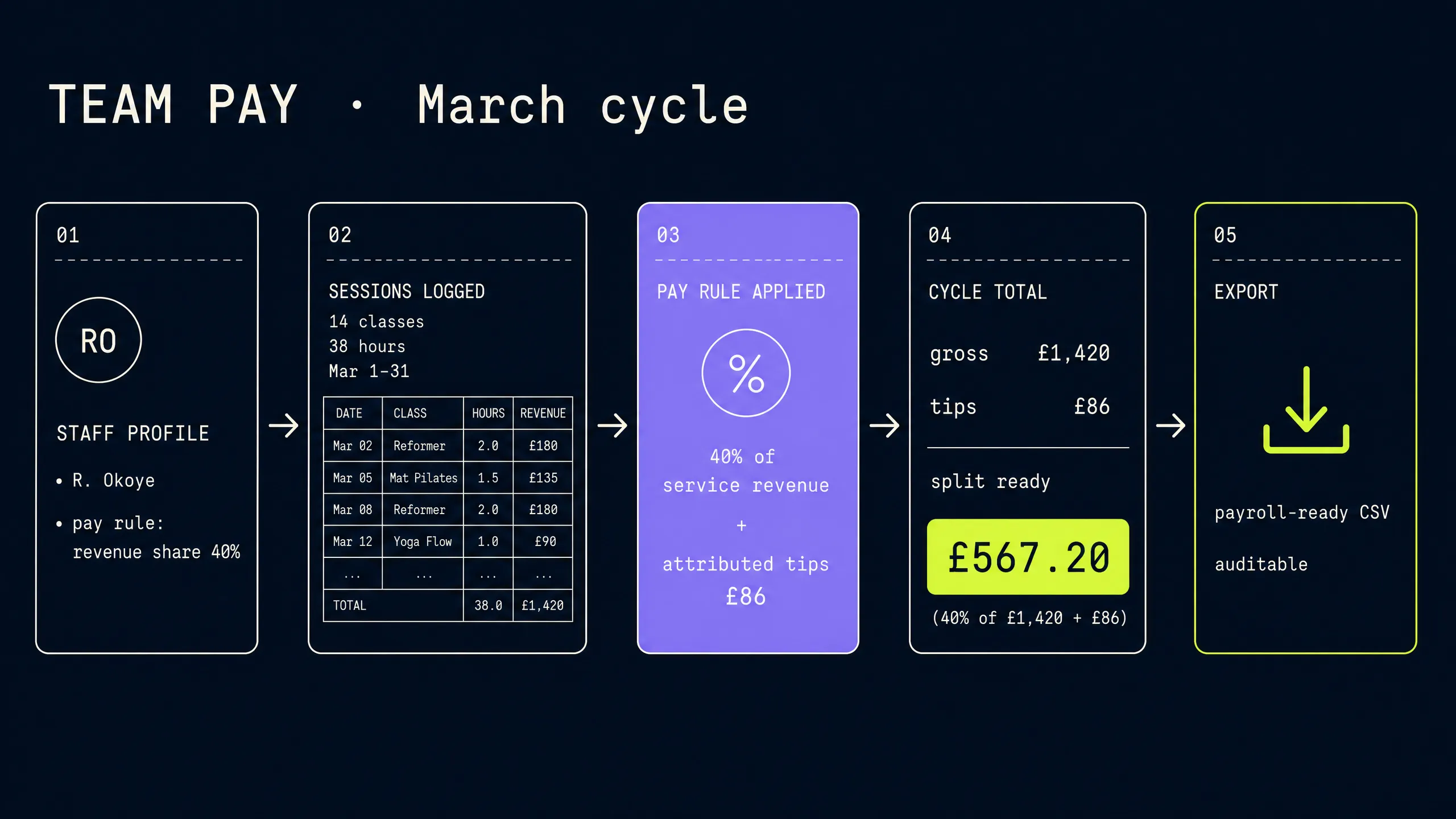
QUE is the single source of work records — it feeds your payroll software rather than pretending to be it.
Less spreadsheet archaeology at the end of the pay period.
09 — WALK-INS
Keep the walk-in queue moving without losing the appointments.
Walk-ins are the lifeblood and the chaos of a studio at the same time. With a live queue, appointments keep their promise and walk-ins get an honest estimate instead of a maybe.
The unexpected part of the day shouldn't break the planned part.
10 — BRAND
Your studio should still look like your studio.
Your fonts, your colours, your domain. The booking experience sits on your website as an inline block, a popup or a floating button — and carries your identity through the whole flow.
The infrastructure can disappear behind your customer experience.
11 — RETENTION
The relationship shouldn't end when the class does.
Most studios lose members quietly — a pause that becomes a goodbye, and nobody ever quite knows when the goodbye happened. QUE keeps the relationship alive after the booking, with messages and offers that give people an easy way back, so a lapsed member is a conversation rather than a lost revenue line.
Member goes quiet
A member stops booking. QUE notices the pause — no manual list-scanning required.
Trigger
The win-back rule fires on the schedule you set: days 3, 7 and 30.
Message
A personal, studio-voiced message goes out — not a bulk blast.
Offer & rejoin
A tailored offer and a one-click rejoin link. The plan picks up where it paused.
Return booking
The comeback lands on the calendar like any other booking — with eligibility checked.
Keeping the relationship alive after the booking.
12 — A DAY WITH QUE
Tuesday, told properly.
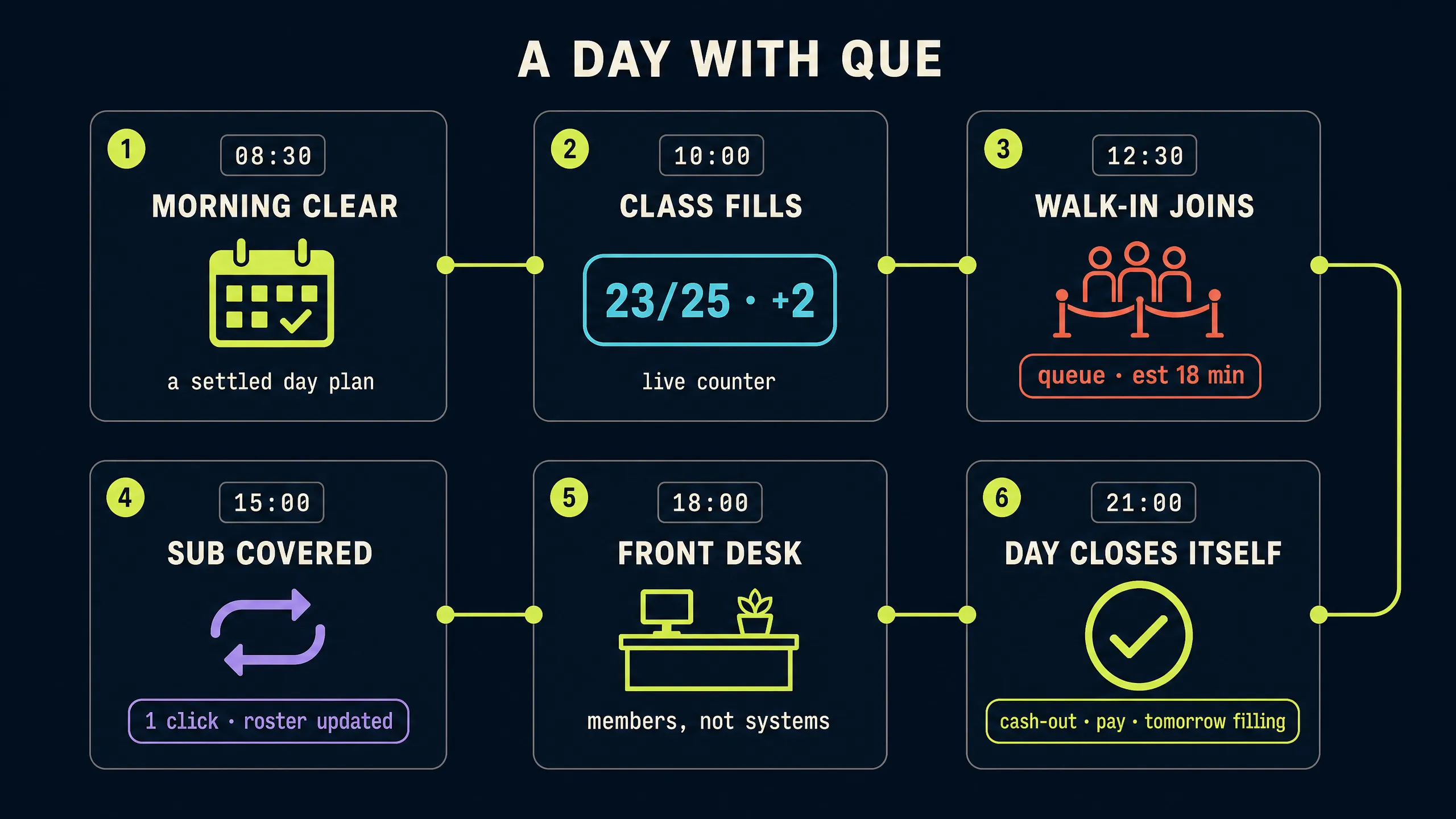
The same Tuesday from the start of the page — now told from inside the system. Every beat is a real product flow, in the order it actually happens. Nothing here is marketing theatre; this is the operating day as the calendar experiences it.
The morning is already clear.
Before the doors open, today's schedule is settled: which classes run, who teaches, which chairs are booked, how many walk-ins to expect. The day starts with a plan instead of a puzzle.
The 10 am class fills.
Bookings land on the calendar in real time. Capacity counts tick up on every screen at once — front desk, instructor app, door list.
A cancellation opens a seat.
The waitlist is offered the spot automatically. One member taps yes, eligibility checks itself, and the class is full again within a minute — no one chased anyone.
A walk-in joins the queue.
No appointment, no problem: they get a live wait estimate, and the queue slots between scheduled chairs without disturbing them. An SMS tells them when to come back in — the walk-in gets a fair deal, and the booked client gets their promise kept.
The evening teacher needs cover.
One click swaps in the substitute. Enrolled members get the change, the pay rule follows the new assignment, and the rest of the recurring series doesn't blink.
The front desk welcomes people.
During the evening rush the team handles members, not systems — arrivals, tips, checkouts. Everything behind it is one shared operational view.
The day closes itself.
Shift cash-outs, pay-cycle records, attendance and revenue are already written down. Tomorrow's classes are filling, and lapsed members are receiving their win-back message.
13 — REAL TEAMS
Pick the studio that sounds like yours.
One product, many operating shapes. Each of these runs on the same calendar — the scene changes, the foundation doesn't.
Salon
Stylists + services + tips
Per-stylist pricing, tip attribution and end-of-shift cash-out — without a spreadsheet.
14 — THE BIG IDEA
The calendar should carry the load.
So your team can spend more of the day with people.
15 — WHAT YOU GET
Everything, grouped by how you actually use it.
This is the dense part of the page — on purpose. Five operating systems, each one a real slice of the product.
Scheduling
- Class scheduling with capacity
- Recurring courses and cohorts
- Waitlists with auto-promote
- Walk-in queues with live estimates
- Instructor assignment and substitutions
- Resources, rooms and chair rules per service
- Buffers and blackout periods per service type
Membership
- Unlimited, capped and family plans
- Class packs with expiry and gifting
- Eligibility checked at booking
- Paused memberships and grace periods
- Low-balance warnings and auto-renewal
- Member-only pricing without coupon codes
Team
- Instructor scheduling and swaps
- Work records per pay cycle
- Tips attributed to staff
- End-of-shift cash-outs
- Pay rules: per-class, per-head, revenue share
- Payroll-ready exports
Customer
- Booking on any device
- Membership self-service
- Confirmations and reminders
- Win-back and review requests
- Repeat-visit booking with the same provider
- Live wait estimates for walk-ins
Experience
- Fonts, colours and custom domain
- Schedule embed on any site
- Customer-facing booking
- Gift cards with a shared wallet
- Add-ons at checkout
- SMS notifications for queue position
16 — COMPARISON
Built for the way studios actually operate.
A short orientation — no caricatures, no made-up competitor lists.
| Need | Generic booking tool | QUE |
|---|---|---|
| Classes + appointments | Often separate tools | Unified where supported |
| Waitlist | Basic or manual | Supported workflow |
| Memberships | External workaround | Product-supported |
| Instructor work records | Manual | Product-supported |
| Tips with staff attribution | Cash notebook | Attributed at checkout |
| Walk-ins | Separate process | Integrated where supported |
| Recurring courses and cohorts | Generic event | Course-aware calendar |
| Studio-specific workflow | Generic | Designed around operation |
17 — QUESTIONS
The answers, straight.
Everything here reflects how the product actually behaves.
Can I run classes and one-to-one appointments together?
Yes. Group classes, recurring courses, 1:1 chair services and walk-in queues share one calendar — each with its own capacity, duration, recurrence, waitlist, staffing and resource rules.
Can members use packages?
Yes. Pack memberships consume credits automatically when a class is booked, warn when they run low, and can be paused or gifted. Members book at member rates without coupon codes, and eligibility is checked inside the booking rather than at the door — so pack members never stand in the lobby having their balance argued over.
How do waitlists work?
When a member cancels inside the notice window, the seat is offered to the next person on the waitlist with a configurable response window. If they don't answer in time it falls through to the next member — automatically. Every cancellation re-offers revenue instead of leaving it on the table, and you always know exactly how much demand you are turning away from the waitlist length.
Can instructors be substituted?
Yes. Swapping an instructor on a single occurrence is one click; enrolled members are notified, the pay rule follows the new assignment, and the rest of the recurring series stays intact. The class never needs to be cancelled and re-booked, so members keep their spots and the cohort keeps its momentum.
Can I handle walk-ins?
Yes. Walk-ins join a live queue with a real-time wait estimate, and an SMS goes out when their turn is near. Appointments are protected — walk-ins slot between them instead of pushing them off.
How do tips work?
Tips are prompted at checkout and attributed to the staff member who delivered the service. They are separated from business revenue in reports, ready to include in payroll exports if your scheme distributes tips through payroll. Staff see what they earned per shift, which is good for morale — and good for the end-of-month conversation.
How are staff work records handled?
QUE records hours, classes and sessions per staff member each pay cycle, applies the pay rules you configured (per-class, per-head or revenue share) and exports a payroll-ready record. It feeds your payroll workflow rather than replacing it.
Can I embed the schedule on my website?
Yes. One script tag drops the schedule inline, in a popup, or as a floating action button on any site. It resizes itself and carries your branding — it looks like your site, not ours. That matters commercially: every booking that starts on your domain stays on your domain, and the trust you spent years building on your website doesn't disappear when a customer reaches the booker.
Can the experience match my brand?
Yes. Your fonts, your colours and your domain on the booking experience. Public-facing pages feel like an extension of your studio, and the booking infrastructure disappears behind your customer experience.
What happens when a member cancels?
The cancellation opens the seat to the waitlist automatically. If the member cancels their membership entirely, an opinionated win-back campaign reaches them at 3, 7 and 30 days with a tailored offer and a one-click rejoin link.
WHAT'S NEXT
Keep the energy in the studio — not in the spreadsheet.
QUE gives studios one operational place for bookings, classes, members, people and the moments that happen between them. The schedule carries the load so the team can spend their energy on the customers in front of them.